
Child Safe Kit

Profiles

Resources

Your Child Profiles

+ New Child Profile
You currently have no Child Profiles.

Guardians

+ New Guardian Profile

You currently have no Guardian Profiles.

Profiles shared with you
No Child Profiles have been shared with you yet.

Child Safe Kit

Profiles

Resources

Share App

Sharing is Caring

Do other people you know have the Child Safe Kit app? If not, why not share it with them!

Cancel

Share Child Safe Kit

Share Via:

or

Cancel

Share Child Safe Kit

Share

Choose Relationship

Please select the most accurate relationship for who you're sharing Child Safe Kit with.

Please confirm you want to share the app with ""

Cancel

Continue

App Shared

You have successfully shared the Child Safe Kit app with the recipients

They will receive a text message and a representative will contact them to activate the app. You can also share your child profiles with these recipients.

Back to Profiles

Select Contacts

Next

Barbara Miller

Charles Brown

Dorothy Davis

James Williams

John Smith

Linda Jones

Mary Rodriguez

Michael Johnson

Susan Wilson

Thomas Johnson

Share Child Safe Kit

Contact name *

First name * Validate First name is correct

Last name * Validate Last name is correct

Phone number *

State *

City *

Relationship *

Notes

Share

Choose Relationship

Please select the most accurate relationship for who you're sharing Child Safe Kit with.

Cancel

New Message

Cancel

To:

Please confirm you want to share the app with ""

Cancel

Continue

"Child Safe Kit" Would Like to Access Your Contacts

Used to establish who you would like to share the Child Safety Kit app with.

Don't Allow

OK

How to Share the Child Safe Kit App

To share the Child Safe Kit app select the "Share App" option in the header.

Click the "Share the app" button at bottom of screen.

Select contacts from the contact list or enter the contact's phone number. Then click the green arrow in the upper-right corner of the screen.

If selecting contacts from the contact list the user may have to allow access to their device by selecting "Ok" from the pop-up screen.

Enter the information of the contact to share the app with.

Required information is first name, last name, phone number, state, city and relationship.

Remember to keep the notes brief. Examples include: number of kids (1k, 3d, 2s, 3, etc.), marital status (S, M, SO) and occupation.

When entering the contact's address, the application will recommend cities based on the state entered as the user begins typing the city name.
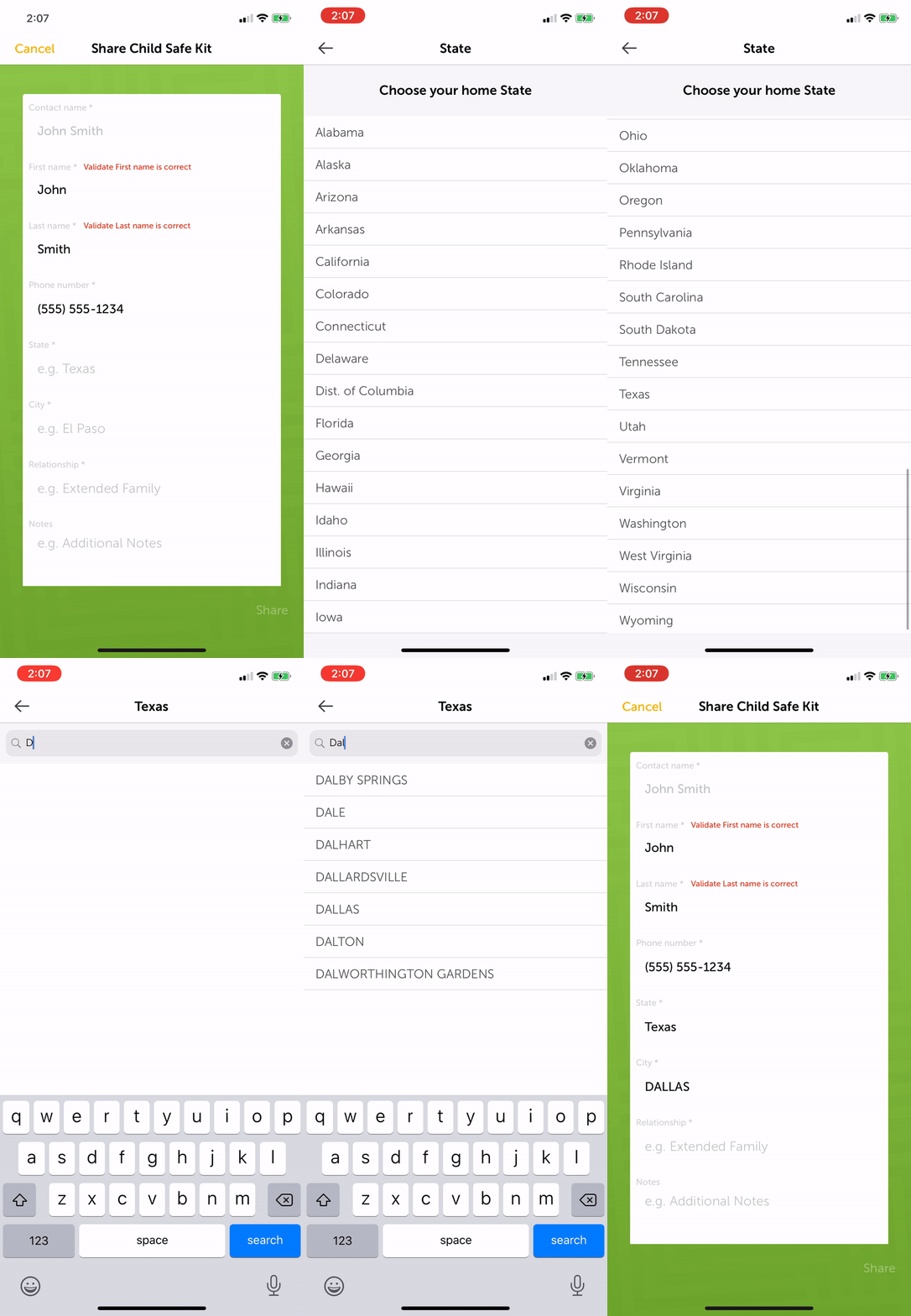
When ready to advance, click the "Share" button at the bottom of the screen. When prompted to confirm that you would like to share the app click "Continue".

This screen confirms that the app has been shared.

Click "Back To Profiles" to return to the app's home screen or "Share Again" to share the app with another contact.

A list of contacts on the user's device will be displayed on this page. There is no limit to the number of contacts the user can select. Please select five contacts from the list. When ready to continue, click the "Next" button in the upper-right corner.

Review the information from the contacts that were selected and input the additional required information.

Required information is First name, Last name, Phone number, State, City and Relationship.

Remember to keep the notes brief. Examples include: number of kids (1k, 3d, 2s, 3, etc.), marital status (S, M, SO) and occupation.

When entering the contact's address, the application will recommend cities based on the state entered as the user begins typing the city name.

When ready to advance, click the "Share" button at the bottom of the screen. When prompted to confirm that you would like to share the app click "Continue".

The device will open the default text messaging application and create a pre-written text message ready to be sent to the selected contacts.
When ready to send, click the send button. The location or design of this button may vary depending on the text application being used.
In this example click on the green circle in the lower-right corner of the screen.
Child Safe Kit

Perfiles

Recursos

Compartir App

Los perfiles de sus Niños

+ Nuevo Perfil del Niño

Actualmente no tienes Perfiles de Niños.

Guardianes

+ Nuevo Perfil del Guardian

Actualmente no tienes Perfiles de Guardianes.

Perfiles compartidos con usted

Aún no se ha compartido ningún perfil de niño.

Child Safe Kit

Perfiles

Recursos

Compartir App

Compartir es demostrar interés

¿Conoce a otras personas que tengan la aplicación Child Safe Kit? Si no, ¿por qué no compartirla con ellos?

Cancelar

Compartir Child Safe Kit

Compartir a través de:

o

Cancelar

Compartir Child Safe Kit

Compartir

Elija la Relación

Seleccione la relación más precisa de con quién está compartiendo Child Safe Kit

Confirmar que desea compartir la aplicación ""

Cancelar

Continuar

App Shared

Usted ha comartido exitosamente la aplicación Child Safe Kit con los destinatarios

Ellos recibirán un mensaje de texto y un representante los contactará para activar la App. Usted también puede compartir con ellos los perfiles de los niños.

Regresar a los Perfiles

Seleccionar contactos

Siguiente

Barbara Miller

Charles Brown

Dorothy Davis

James Williams

John Smith

Linda Jones

Mary Rodriguez

Michael Johnson

Susan Wilson

Thomas Johnson

Compartir Child Safe Kit

Nombre del contacto *

Nombre * Validar que el nombre sea el correcto

Apellido * Validar que el apellido sea el correcto

Numero telefónico *

Estado *

Ciudad *

Reclacíon *

Notas

Compartir

Elija la Relación

Seleccione la relación más precisa de con quién está compartiendo Child Safe Kit

Cancelar

Nuevo mensaje

Cancelar

To:

Confirmar que desea compartir la aplicación con ""

Cancelar

Continuar

"Child Safe Kit" le gustaría acceder a sus contactos

Se utiliza para establecer con quién le gustaría compartir la aplicación Child Safety Kit.

No permitir

OK

Cómo compartir la aplicación Child Safe Kit

Para compartir la aplicación Child Safe Kit, seleccione la opción "Compartir App" en el encabezado.

Pulse el botón "Compartir aplicación" en la parte inferior de la pantalla.

Seleccione contactos de la lista de contactos o ingrese el número de teléfono del contacto. Luego pulse en la flecha verde en la esquina superior derecha de la pantalla.

Si selecciona contactos de la lista de contactos, el usuario puede tener que permitir el acceso a su dispositivo seleccionando "OK" en la pantalla emergente.

Ingrese la información del contacto para compartir la aplicación.

La información requerida es nombre, apellido, número de teléfono, estado, ciudad y relación.

Recuerde mantener la brevedad. Los ejemplos incluyen: número de hijos (1k, 3d, 2s, 3, etc.), estado civil (S, M, SO) y ocupación.

Al ingresar la dirección del contacto, la aplicación recomendará ciudades según el estado ingresado conforme el usuario teclee el nombre de la ciudad.

Cuando esté listo para avanzar, pulse el botón "Share" (Compartir) en la parte inferior de la pantalla. Cuando se le solicite confirmar que desea compartir la aplicación, pulse en "Continuar".

Esta pantalla confirma que la aplicación ha sido compartida.

Pulse "Volver a perfiles" para regresar a la pantalla inicial de la aplicación o "Volver a compartir" para compartir la aplicación con otro contacto.

En esta página se mostrará una lista de contactos en el dispositivo del usuario. No hay límite para la cantidad de contactos que el usuario puede seleccionar. Seleccione cinco contactos de la lista. Cuando esté listo para continuar, pulse el botón "Siguiente" en la esquina superior derecha.

Revise la información de los contactos seleccionados e ingrese la información adicional requerida.

La información requerida es nombre, apellido, número de teléfono, estado, ciudad y relación.

Recuerde mantener la brevedad. Los ejemplos incluyen: número de hijos (1k, 3d, 2s, 3, etc.), estado civil (S, M, SO) y ocupación.

Al ingresar la dirección del contacto, la aplicación recomendará ciudades según el estado ingresado conforme el usuario teclee el nombre de la ciudad.

Cuando esté listo para avanzar, pulse el botón "Compartir" compartir la aplicación, pulse en "Continuar".

El dispositivo abrirá la aplicación de mensajes de texto predeterminada y creará un mensaje de texto listo para ser enviado a los contactos seleccionados.
Cuando esté listo para enviar, haga clic en el botón de enviar. La ubicación o el diseño de este botón puede variar según la aplicación de texto que se utilice.
En este ejemplo, pulse el círculo verde en la esquina inferior derecha de la pantalla.